For heating & air companies with 3 to 30 people. Plumbing and roofing too.
Your website says 24/7. This is who answers at 2 a.m.
FixLine AI is a phone agent for HVAC companies. It answers when you can't: after hours, on weekends and when the office is on another line. It sorts real emergencies by your rules, books the job and texts you a summary of every call.
Talk to it in your browser, no sign-up. First 30 days free, then $149 a month per location.
The problem
Missed calls are lost jobs.
The office is on the other line
Your office answers 8 to 5, but one person can take one call at a time. When she's on the other line, the next caller gets an answer instead of voicemail. She gets the summary, you get the job.
The first heat wave or freeze
When the weather turns, everyone calls at once. It takes every call, books the regular ones for the next open window and flags the emergencies.
Members get member treatment
It knows your maintenance-agreement customers and gives them their priority and fee discount, by your rules.
Missed calls are lost jobs
A homeowner with no heat or water on the floor does not leave a voicemail. They call the next company on Google, and the first one who actually talks to them usually gets the job.
Things break after 5 pm
Weather turns at night and on weekends. Somebody has to pick up, and it should not always be you.
The line is busy during the day too
When the office is on another call or you are on a roof, the next caller hears voicemail.
Not every call should wake the tech
A tune-up can wait until morning. No heat with a baby in the house cannot. Somebody has to tell the difference.
What FixLine AI does
It answers the calls you miss and gets the job on the calendar.
Only the calls you would have missed: after hours, on weekends, and when you're busy or on a job.
Answers 24/7
Nights, weekends, holidays, and whenever your line is busy or nobody picks up.
Triages by your rules
No heat in a freeze, no AC in a heat wave, an elderly person or an infant at home: your thresholds, applied the same way on every call.
Safety steps first
Gas smell or CO alarm: get everyone outside and call 911 or the gas company from there, then a tech is sent.
Books the job
Emergency: states your after-hours fee, gets a yes, pages the on-call tech. Otherwise: books a window for the next day.
Texts you a summary
Name, address, problem, urgency and booking, after every call. You see what happened without listening to a recording.
Hands off to a person
Callers can always leave a message for you or the on-call manager. Work you don't do gets pointed elsewhere, kindly.
Not another answering machine
Built around what owners hate about answering services.
Callers hang up on slow robots
Short answers, no long pauses, and it stops talking when the caller talks.
“Voicemail with extra steps”
The goal of every call is a booked job, not a message. It checks the schedule and books the slot.
Techs get half the information
Name, address, problem, who is home and urgency, read back to the caller before the call ends.
No way to reach a person
A person is one sentence away. Ask for one and it takes a message for your on-call manager, no loops.
Pretending to be human
If asked, it says it is your company's virtual assistant, then gets the tech scheduled.
Making things up
It never quotes repair prices or diagnoses. The only price it says is the after-hours fee you set.
Hear it yourself
Don't take our word for it. Talk to it.
The demo agent answers as Lone Oak Heating & Air, a fictional company in Dallas–Fort Worth, TX. Pretend your furnace just stopped and see what happens.
Talk to it right in your browser.
No phone, no sign-up. Press the button and allow the microphone.
Talk to it nowThings to try
- “The furnace stopped and we have a baby at home.”
- “I smell gas near the furnace.”
- “I'd like to schedule a tune-up.”
- “I just want to talk to a person.”
How switching on works
Keep your number. Turn on call forwarding. About 10 minutes.
Conditional call forwarding sends calls to FixLine AI only when you're busy, don't answer, or after hours. Calls you answer stay with you.
- 1
Pick your rules
Which calls count as emergencies, your after-hours fee, who is on call and who gets the summary.
- 2
Turn on call forwarding
On your business line, forward calls when busy, unanswered or after hours to the number we give you. About 10 minutes.
- 3
Test it together
We make test calls with you before any customer hears it. Then it goes live on your real calls.
- 4
You decide
After 30 days you keep it at $149 a month per location, or you switch the forwarding off. Your data stays yours either way.
What you get
What lands on your phone after every call.
Text message · 9:02 PM
FixLine AI · Lone Oak Heating & Air
URGENT · No cooling, infant in the home
Caller: Jessica Turner, (555) 014-7731
Address: 4120 Mesa Ridge Dr, Plano
Issue: AC blowing warm since 6 pm, thermostat on
Booked: after-hours visit 9:30–10:30 pm, fee quoted $189
On-call tech (Mike) paged 9:02 pm
Recording and transcript in your email.
Booked jobs
Jobs on the calendar instead of names on a voicemail list.
Emergency triage by your rules
Your definition of an emergency, your fee, your on-call tech.
Safety steps for gas and CO
The caller hears what to do before anything else happens.
A text summary after every call
To you and the on-call tech, so nobody calls the customer back blind.
Starts simple. Connects to your software later.
Pilots start with a text and email summary after every call and bookings in a shared calendar. FixLine AI can connect to field-service software such as ServiceTitan, Housecall Pro or Jobber, or to Google Calendar, through their APIs. These connections are planned per customer, not switched on by default.
Product names belong to their owners. We are not affiliated with or endorsed by these vendors.
Who it's for
Built for the trades that get emergency calls.
HVAC
No heat, no AC, gas smell or a tune-up request: answered, sorted and booked, day or night.
Learn more →Plumbing
Burst pipes, leaks, backups and no hot water: the caller gets the right first step, you get the job.
Learn more →Roofing
Storm and leak calls answered, sorted by your rules, and estimates booked while the caller is still on the line.
Learn more →Pilot
First 30 days free. Then $149 a month per location.
Low risk by design. If it doesn't book jobs for you, switch it off.
Start the free pilot- 30 days on your real calls, set up for your company and your rules
- After that, $149 per month per location if you keep it
- No long contract. Cancel any time by turning off call forwarding and telling us
- You keep your number. Calls you answer stay with you; FixLine AI only gets the ones you would have missed
Meet the team
The people behind FixLine AI.

Boban Janković
Founder, engineer
I'm Boban. I've been building software for ten years: frontend first, then full-stack, then leading teams and products.
Before this I spent three years as a senior engineer at Robin Powered, a Boston workplace SaaS company.
FixLine AI is what I build for home-service companies: a phone agent that picks up when you can't, follows your rules and gets the job on the calendar. I build and run it myself, so you talk to the person who writes the code.
Also on the team
- Gabrijela Višek ↗ · Design & illustration
FAQ
Straight answers.
Is there a live demo?
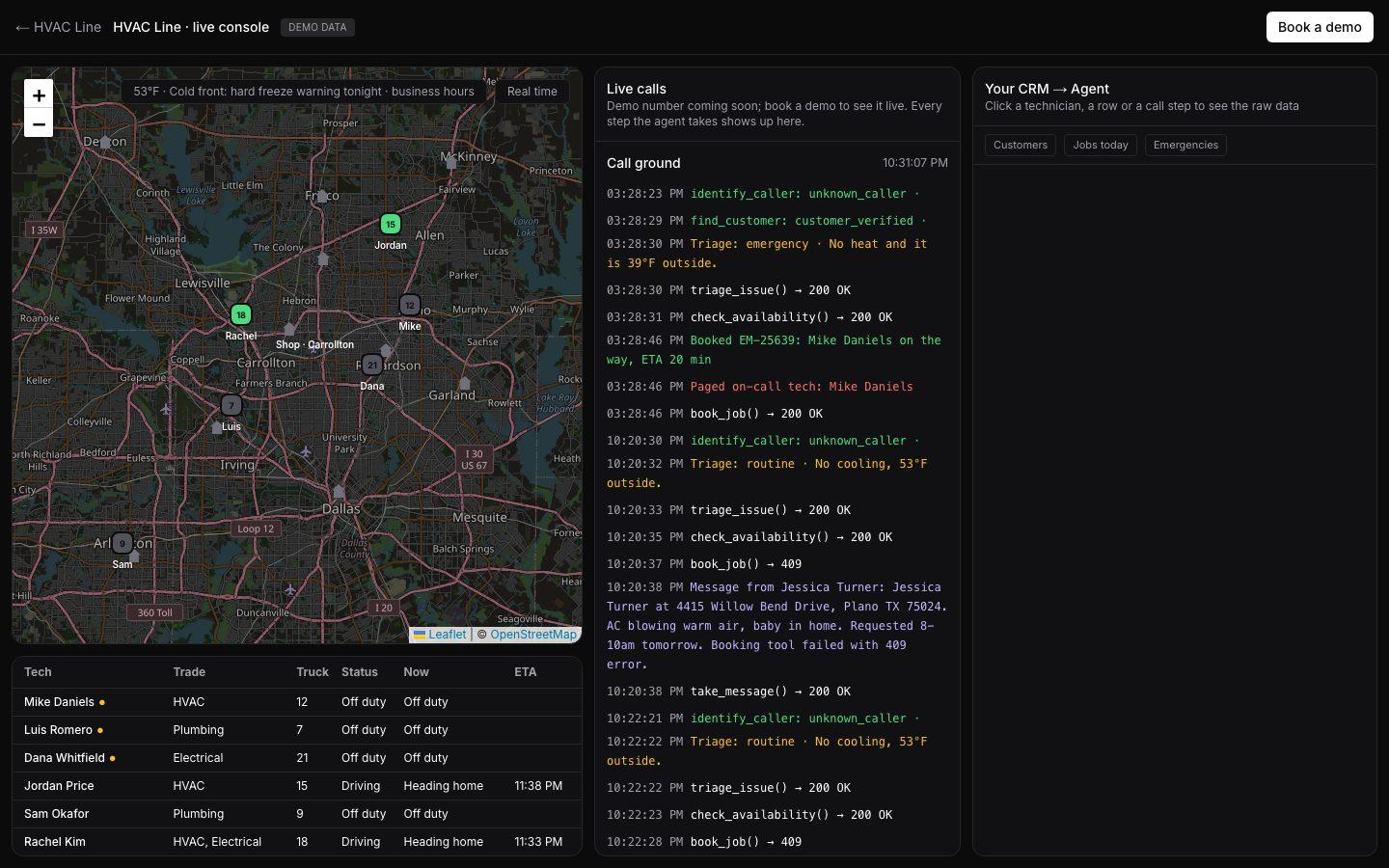
Yes. Open the demo and press "Talk to it now". It runs in your browser: no phone, no sign-up, just allow the microphone. It answers as Lone Oak Heating & Air, a fictional company, and you can watch every step in the live console.
Do I have to change my phone number?
No. You keep your number and turn on conditional call forwarding: calls go to FixLine AI only when you're busy, don't answer, or after hours. It takes about 10 minutes, and you can switch it off just as fast.
Will my customers know it's not a person?
If they ask, yes. It says it's your company's virtual assistant and offers to get a tech scheduled or have someone call back. Pretending to be human backfires, so it doesn't.
What if a caller just wants a human?
It doesn't argue or loop. It takes their name, number and reason and passes it to you or your on-call manager right away.
Does it give prices or diagnose problems?
No. It never quotes repair prices or guesses at a diagnosis. The only price it says is the after-hours fee you set, and only for emergency visits.
Does it work with ServiceTitan, Housecall Pro or Jobber?
Pilots start with text and email summaries and a shared calendar, so nothing changes in your software. Connecting to ServiceTitan, Housecall Pro, Jobber or Google Calendar through their APIs is planned per customer.
What does it cost?
The first 30 days are free. After that it's $149 a month per location. No long contract; cancel any time.
What if the AI gets something wrong?
The rules that matter (what counts as an emergency, fees, who gets woken up) are fixed rules, not left to the AI. Every call is logged and summarized, and during the pilot we go through the calls with you.
Contact
Tell us how calls reach you today.
A real person reads every message and answers within one business day.